In order for your device to connect to the outside world (internet) it requires an IP address. In order to obtain an IP address a DHCP server is required. Your device sends out a broadcast message looking for a DHCP server. Which is the start of the process your device and the DHCP server go through for your device to receive an IP Address
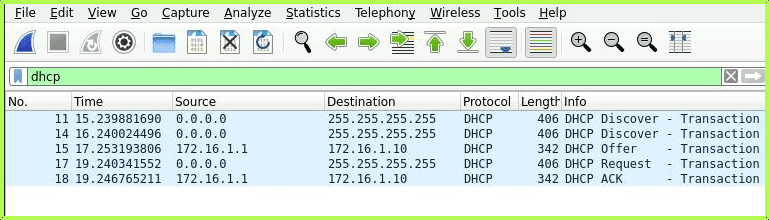
The 4-stage process known as D.O.R.A which stands for Discovery, Offer, Request, and Acknowledge, explained below
Discovery – Your device sends out a network broadcast over the network to locate the DHCP Server
Offer – The DHCP server sends an offer message including the IP address, Subnet mask and default Gateway and DNS server information.
Request – Your device receives the offer and sends a message to formally request to use the offered IP address information
Acknowledgement – The DHCP server sends a message back to your device confirming the IP address information.
I’ve set up a small lab with the following topology to show the working of DHCP using a router as a DHCP server
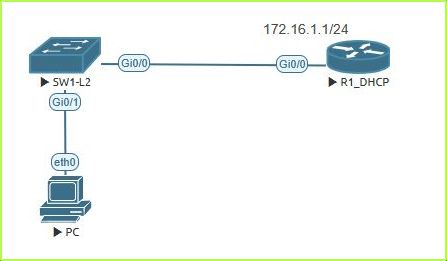
This is the config for the DHCP server on the router
ip dhcp pool MANAGEMENT
network 172.16.1.0 255.255.255.0
default-router 172.16.1.1
Here is the Packet Capture showing the 4 stage of the DORA process of DHCP.

 Luke Evans Networks
Leave a comment