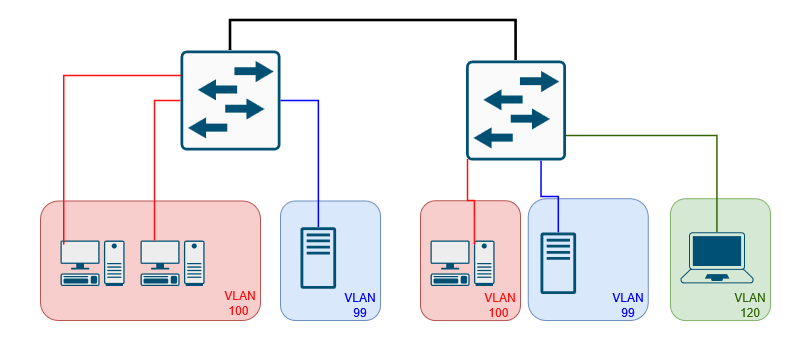
VLANS stands for Virtual Local Area Network they are configured to break up networks in to logically segments into multiple broadcast domains. VLANS can be used to group like devices together such as end user devices, VOIP/Video devices, printers, services or separate traffic from different departments, in some ISP environments VLANs assigned to each customer to separate traffic from other customers, You would have a customer VLAN (C-TAG) and another VLAN know as a outer VLAN or service VLAN (S-TAG) is added this could be for town or neighborhood this is known as double tagging in the ISP world.
VLANs are configured on network switches and operate at the layer 2 level of the OSI mode. VLANS tag ethernet frames with VLAN ID which is a 12-bit field in the 802.1Q header. VLAN ID ranges from 1 to 4094. Normal range from 1-1001 and the extended range from 1006 to 4094. VLANs 1002-2005 are Cisco reserved for legacy tech and can not be used. Issuing a Show VLAN command will show those 4 VLANs are used 1002 – Fiber Distributed Data Interface (FDDI), 1003 is used for token-ring, etc.
Traffic can only send between the same VLAN this is done by when switches examining the VLAN Tag and forward out the interface that are assigned the VLAN, if the frame does not have an Untagged frame is received it is set interfaces with the default/native VLAN. In order for VLANs to communicate with other VLANs with different IDs require a layer 3 device such as a layer 3 switch or a router and Inter VLAN routing must be configured.
There are different types of VLANS
- Data VLAN: used to carry data traffic mostly from end users
- Voice VLAN: Configured for voice traffic, they tag voice traffic and separate from data traffic and ensure QoS and reduce jitter.
- Management VLAN: Used to separate management traffic from the rest of the network such as SNMP, SSH, syslog traffic.
- Default/Native VLAN: Default or Native VLANs are interfaces that are all in VLAN 1 by default with out any configuration on a management switch. It’s always a good idea to change the Default/Native VLAN to a different VLAN ID than 1.
- NULL VLAN: Are VLANs sometimes configured to assign interface that are not in use, instead of them being assigned to a default/native VLAN.
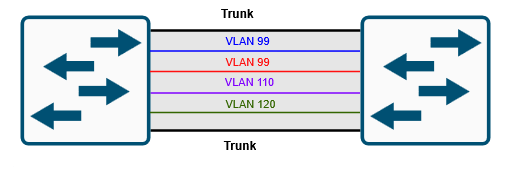
VLANs are configured on switch interfaces as access ports and interfaces that connect to other switches or routers are configured as a trunk port. Trunk ports are used to carry multiple VLANs over a link between other switches, routers or firewalls. Trunks can be configured to carry all VLANS, or you can configure pacific VLANs that you want to allow on the trunk at which point you have to be careful when adding and removing that you do not remove all VLANs and risk losing connection to the switch, I’m sure we have all made that mistake or if you haven’t it’s just a matter of time. VLAN information is stored in the VLAN database on the switch under the file vlan.dat in the flash memory on a switch. See my example below of a trunk carrying a VLANs.
Creating a VLAN on a cisco switch is done with the following commands, it’s also a good idea to name your VLANs to for organization and letting others know what those VLANS are for.
SW1_L2(config)#vlan 90
SW1_L2(config-vlan)#name MANAGEMENT-VLAN
SW1_L2(config)#vlan 100
SW1_L2(config-vlan)#name DATA-VLAN
SW1_L2(config)#vlan 110
SW1_L2(config-vlan)#name VOICE-VLAN
SW1_L2(config)#vlan 120
SW1_L2(config-vlan)#name GUEST-VLAN
Assigning a VLAN and voice VLAN to interfaces
SW1_L2(config-if)#switchport mode access <- Making the interface an access port
SW1_L2(config-if)#switchport access vlan 100 <- Assigning VLAN 100 to the interface
SW1_L2(config-if)#switchport voice vlan 66 <- assigning voice VLAN to the interface
If you haven’t created the VLAN and named it before you assign an interface to it in some switches the VLAN will be automatically created but it will not be named, you will see a log message that the switch is creating the VLAN for you in the following example.
SW1_L2 (config-if)#switchport access vlan 120
% Access VLAN does not exist. Creating vlan 120
VLANS can be removed with the following command
SW1_L2 (config)#no vlan 100
Trunk ports can be configured with the following commands
SW1_L2(config)#int gi0/2
SW1_L2(config-if)#switchport trunk encapsulation dot1q
SW1_L2(config-if)#switchport mode trunk
To allow certain VLANs to be allowed on a trunk you must issue the following commands
SW1_L2(config-if)#switchport trunk allowed vlan 90,100,110,120
To add VLANs to a trunk is where you have to use cation, you must use the add keyword or all the VLANs that are assigned to that trunk interface will be removed and you may lose connectivity to the switch
SW1_L2(config-if)#switchport trunk allowed vlan add 120
To remove you must use the keyword remove
SW1_L2(config-if)#switchport trunk allowed vlan remove 120
Some troubleshooting commands for VLANs are the following
Show vlan – shows the VLAN database
show interfaces status – shows the status of the interface and which VLAN they belong to.

Show interface switchport – Shows if the interface is set to access or trunk shows the VLAN the interface belongs to, shows if there is a voice VLAN. This command will show you all interfaces you can also do show int gi1/0 switchport.

Show interface trunk – will show what interfaces are configured as a trunk and which vlans are allowed to pass over that trunk.

I didn’t cover anything about VTP (VLAN Trunking Protocol) in during this post but I might do a post about that in the next few weeks.
 Luke Evans Networks
Leave a comment