
With the scaling of today’s networks switches end up connecting to each other, sometimes a switch is connected to a switch to for more access ports in a growing office or connected for redundancy between switches, if a link fails traffic can go through one of the other links that the switch is connected to, however could create a huge problem know as a switching loop. If you have 3 switches connected into each other link in my diagram, SW1 would send a broadcast to switch SW2 and send same broadcast in to SW3 and would send it back in to SW1 and the loop would start. Switch CPU would go to 100%, connectivity will be very slow or drop and there will be endless broadcast frames going out the interfaces, bandwidth gets fully consumed. We are talking about full network apocalypse!! To stop this switching loop from occurring Spanning Tree Protocol (STP) is used. STP is an older protocol but there are newer versions that I will cover during the post, I just wanted to go over why we needed STP in the first place, STP is an old protocol, I wanted to go over why it needed and how it is used today, I will go over the different modes in this post.
Spanning Tree Protocol creates a loop free network STP is defined as IEEE 802.1D. STP blocks/disables ports to stop the loop from happening, only allowing one to be active along the network path between 2 switches. If there is a failure on a link between the switches STP will auto reconfigure the topology and active ports that were blocked and restore connectivity.

Spanning Tree Protocol goes through an election process to select a Root bridge which exchanges bridge protocol data units (BPDUs) which messages the switches to determine which switch ports should be blocked and which should forward traffic. The root bridge is elected based on the bridge IDs, the bridge with the lowest BID is elected as the root bridge. If there is a tie with the BIDs the switch with the lowest MAC address with be elected as the root bridge. The non root switches will determine which port is the root port, designated port and the blocked port.
Root port – The lowest cumulative path cost to the root bridge only non root switches have a root port.
Designated Port – Each network the port with the lowest cost to the root becomes the designated port the switch wit the s port forwards traffic to the root.
Blocked port – All other ports that would cause a switching loop are blocked they receive BPDUs updates but do not forward them.
During STP convergence ports going through the following states:
Blocking – does not forward data, does not learn MAC Addresses
Listening – Does not forward data, does not learn MAC Addresses
Learning – does not forward data, does learn MAC Addresses
Forwarding – Does forward data, does learn MAC Addresses
Disabled – does not forward data, does not learn MAC addresses
There are restraints with spanning tree protocol such as slow convergence time taking up to 50 seconds which is not acceptable for voice or video, single root bridge all traffic flows through the root bridge could cause network bottlenecks and only one path per VLAN. Modern switches don’t support STP and see it as legacy even in my lab with my old Cisco 2960 does not have the older STP version. Cisco switches come the default of PVST+ or RPVST.
To deal with the above issues with STP and with changing technology there are different versions of STP such as the following
- PVST+ – Cisco Proprietary – Per-VLAN Spanning Tree, load balancing across VLANs
- RSTP – convergence in 3–6 seconds
- RPVST – Cisco Proprietary – Combination of the rapid convergence of RSTP and the per-VLAN control of PVST+
- MSTP – Multiple STP instances mapped to VLAN groups
Configuring Spanning-Tree Protocol
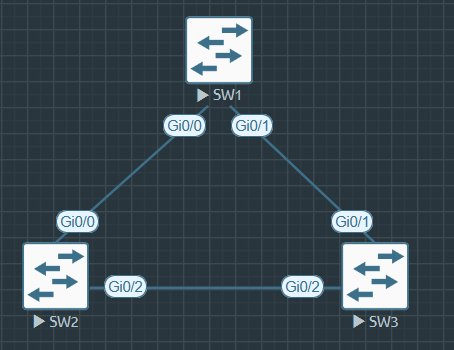
Configuring Spanning-tree is done in the global configuration mode in the switch using the following commands depending on which mode you want to use.
SW1(config)#spanning-tree mode (mst | pvst | rapid-pvst)
When configuring spanning-tree it’s a good idea to configure BPDU Guard on access ports to protect against rouge devices, if an interface with BPDU Guard enabled will go into err-disable if it receives any BPDUs.
BPDU Guard is configured under the interface mode using the following command.
SW1(config-if)#spanning-tree bpduguard enable
Another good idea when configuring spanning tree is to configure spanning tree port fast which allows interfaces to skip the learning and listening stages of STP this is used to stop end devices waiting for the STP stages and allow for DHCP processes from timing out and VOIP phones to register quickly with the voice gateway/ Cisco Unified Communications Manager. To configure port fast it is also done under interface mode with the following command.
SW1(config-if)#spanning-tree portfast edge
Configuring Spanning-Tree Protocol MST
To configure Configuring Spanning-Tree Protocol MST Multiple Spanning Tree, each you VLAN are configured as it’s own instance you also configuration revision number that allows for easier updates when making changes to your STP MST configuration, to show how to configure this I’ll be using the following topology with 4 VLANs configured.
The example I use is in my above topology with the following commands on both SW1 & SW2.
SW1(config)#spanning-tree mode mst
SW1(config)#spanning-tree mode mst configuration
SW1(config-mst)#name MST-LAB
SW1(config-mst)#revision 1
SW1(config-mst)#instance 1 vlan 90
SW1(config-mst)#instance 2 vlan 100
SW1(config-mst)#instance 3 vlan 110
SW1(config-mst)#instance 4 vlan 120
Verify Spanning-tree MST configuration with the command show spanning-tree mst or Show spanning-tree mst 2
You can see the different MST instances are broken up and witch they belong to and you can see how MST0 by default has all the VLANs that have not been assigned to it.

Troubleshooting Spanning tree Protocol Commands
show spanning-tree summary

show spanning-tree detail
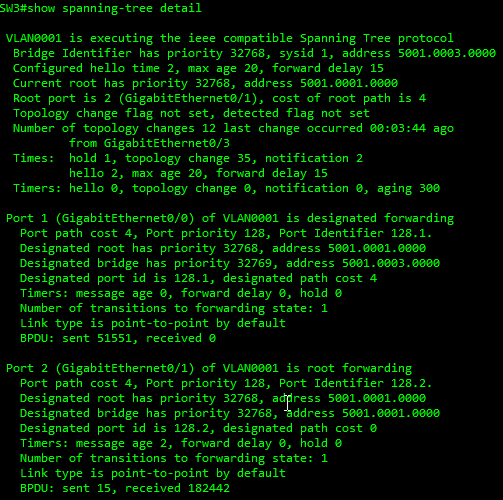
show spanning-tree root

show spanning-tree interface

show spanning-tree vlan

Spanning tree is a great protocol, in my years of networking I haven’t really had to touch it or configure it the most I’ve the only thing I’ve had to do was for troubleshooting is remove the spanning-tree bpduguard command off an interface and add spanning-tree portfast edge to an interface I’m sure everyone has different experiences I’m just speaking for myself.
 Luke Evans Networks
Leave a comment