EIGRP stands for Enhanced Interior Gateway Protocol, it’s a cisco proprietary protocol that is developed by cisco, however now of days it’s been open up to other platforms. I’m only going to be over IPv4 at this time.
EIGRP exchange routing information to form neighbours to dynamically learn and maintain paths within the network. EIGRP discovers and maintains neighbours by sending out multicast hello packets to the address 224.0.0.10 every 5 seconds. Once neighbour relations are formed routing information is shared and EIGRP calculate the best path primary and secondary path for quick fail over recovery. EGIRP neighbours only share information with the same AS Autonomous System number, Matching K-vaules (metric Weights), subnet and authentication settings if authentication is configured.
EIGRP uses DUAL (Diffusing Update Algorithm) which calculates the shortest path and prevents loops. DUAL uses a feasible distance (FD) the lowest metric to a destination and reported distance (RD) the metric advertised by the neighbour. A success is the next hop router with the lowest FD while a feasible successor is the neighbor whose RD is less than the current FD. DUAL prevent loops by not sending updates out the interface that receives them.
EIGRP maintains a number of different tables to maintain routing information.
Neighbor Table – All directly connected routers that have formed a neighbour relationship
Topology Table – All possible routes learned from the neighbors to calculate the Successor and Feasible successor
Routing Table – Best routes by DUAL in the routing table, only successors will appear in the routing table.
EIGRP Packet types
Hello – used to establish and maintain neighbor relations
Update – sends routing information
Query – used when a router goes down and no feasible backup path
Reply – sends in response to a query
ACK – acknowledges certain EIGRP Packets.
EGIRP calculates its metrics based off a sophisticated composite of metrics such as bandwidth, delay, reliability, load and MTU however the default metric only uses bandwidth and delay.
Cisco has an elaborate formulate to calculate its Metrics as which is the following formula.
Metric = [K1 * bandwidth + (K2 * bandwidth) / (256 – load) + K3 * delay] * [K5 / (reliability + K4)] * 256
Default K-values are K1=1, K2=0, K3=1, K4=0, K5=0, simplifying to bandwidth + delay. Bandwidth is inversely scaled: (10^7 / minimum bandwidth in kbps) * 256. For more information how this is calculated please cisco Cisco’s explanation I’m not the best at explaining the calculations of EIGRP to make enough sense.
Configuring EIGRP
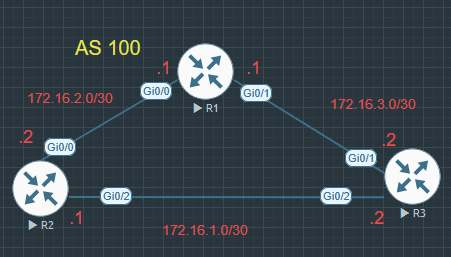
To configure EIGRP you are able there are a few different approaches you can take you can configure it with an autonomous system number, or you can do named EIGRP and matching all networks using a wild card mask. Above is the topology I’m going to be using for the configuration examples.
EIGRP with autonomous system configuration
R2(config)#router eigrp 100
R2(config-router)#router-id 1.1.1.1
R2(config-router)#network 172.16.2.0 255.255.255.252
R2(config-router)#network 172.16.3.0 255.255.255.252
Named EIGRP configuration
R1(config)#router eigrp EVANS-NETWORKS
R1(config-router)#address-family ipv4 unicast autonomous-system 100
R1(config-router-af)#eigrp router-id 1.1.1.1
R1(config-router-af)#network 172.16.2.0 255.255.255.252
R1(config-router-af)#network 172.16.3.0 255.255.255.252
To configure router 3, I’m going to use a wildcard mask that will include all networks that are configured on router3
R3(config)#router eigrp 100
R3(config-router)#router-id 3.3.3.3
R3(config-router)#network 0.0.0.0 255.255.255.255
You can check your configuration by the log messages if you have them turned on to see that neighbours have been formed you can also check by issuing the show ip route command
There are some cases where you do not want EIGRP advised you can do that by using the using the passive interface command which do not send out EIGRP hellos and prevents EIGRP from forming adjacencies on those interfaces. you can also configure all interfaces to be passive and than turn on the ones you want to send out hello packets & form adjacencies, which can be done by using the passive-interface default command and the interfaces you want to enable you would issue no passive-interface gi0/1.
you add the passive interface commands under the router eigrp 100 command or if you are using named EIGRP you do it under the address family command, I’ll provide both examples
R2(config)#router eigrp 100
R2(config-router)#passive-interface gi0/2
R1(config)#router eigrp EVANS-NETWORKS
R1(config-router)#address-family ipv4 unicast autonomous-system 100
R1(config-router-af)# af-interface gi0/0
R1(config-router-af-interface)#passive-interface
Troubleshooting EIGRP
The following commands help troubleshoot EIGRP
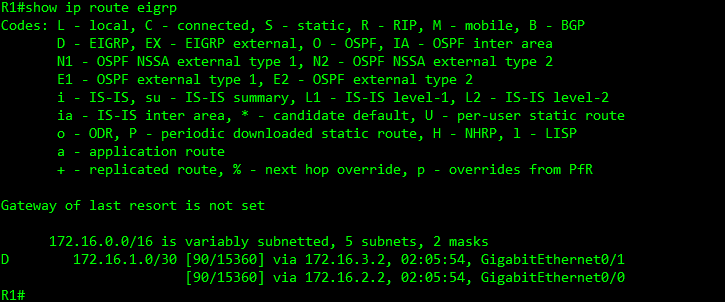
show ip route eigrp – shows the routing table but filters the routes learned by only EIGRP
show ip eigrp neighbors – verify EIGRP neighbors which shows the interface the neighbour is using to send EIGRP hello packets, how long the routers have been neighbours.

show ip eigrp interfaces – will display the interfaces that are participating in EIGRP, and which interface has a peer. Passive interfaces will not show up in this output.

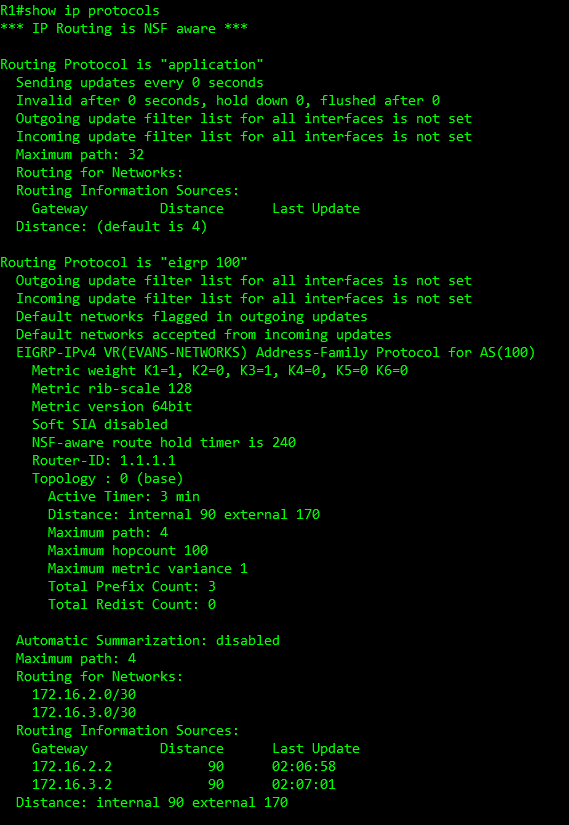
show ip protocols – shows what protocol is running and the AS, shows the router id, it will show the Internal and external AD, the networks that being routed.
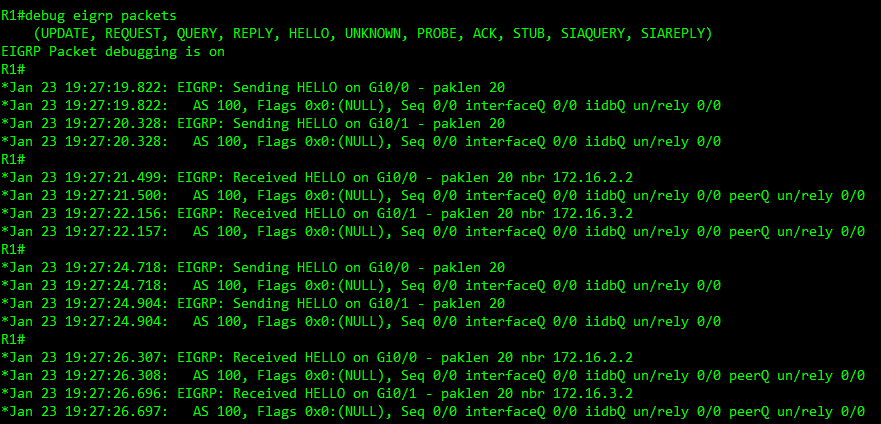
debug eigrp packets – will show a live view of receiving any hello packets from EIGRP neighbours it will also show any mismatched AS numbers, and you can see if you’re not receiving any hello packets from interfaces that you should be and determine your troubleshooting systems from there. Don’t forget to turn your debugging off once you’re done troubleshooting!
There’s number of other features you can do with EIGRP I can do more of an advanced post about more advance topics such as authentication, summarization EIGRP Stub router, EIGRP Route manipulation.
 Luke Evans Networks
Leave a comment