OSPF stands for Open Shortest Path First it is an interior gateway routing protocol. OSPF is a link-state routing protocol. OSPF is my go to protocol that I like working with, OSPF is not a vendor specific protocol, a number of vendors also run OSPF on their networking devices, I’ve personally used OSPF on Juniper and Fortigate. OSPF is a link state protocol that stores the full network topology, OSPF uses autonomous system like EIGRP but also uses areas. There are 2 different versions of OSPF OSPFv2 that supports IPv4 and OSPFv3 that supports IPv6, I’m only going to be covering OSPF IPv4.
OSPF is a very powerful routing protocol with the ability scale using areas. OSFP areas are used in a hierarchical design where all areas must connect back to area 0 the backbone area. A reason for areas was for older Cisco routers limitations with high CPU loads which would cause links to flap it was recommend for a maximum of 40 to 50 routers per area. Now of days there is no hard limit to the number of routers an OSPF area can have but it’s still a good idea to keep the number on the lower ends for troubleshooting, keeping an OSPF hierarchical design.
In order for OSPF routers to establish neighbor’s adjacency it uses hello packets from the OSPF neighbor interfaces. Routers much have the same area ID, subnet, hello and dead timers as well as the stub area flag. OSPF sends link-state advertisements (LSAs) to neighbor routers. LSAs are stored in local database called the link-state database (LSDB). Routers running OSPF will flood LSAs throughout the network, routers running OSPF will all keep an identical copy of the LSDB within the same area, which provides an overall topology of the network. There are different types of LSAs that I’ll be going over in this post.
The process of neighbor adjacency forming is sent over multicast-based updates using addresses 244.0.0.5 and 244.0.0.6.
The neighboring most common states are the following:
- Down: no information received from neighbors.
- Init: Hello is received, but bidirectional communication is not confirmed yet.
- 2-way: bidirectional communication is established
- ExStart: Database synchronization initialization
- Exchange: Database packets are exchanged
- Loading: request missing /more recent LSAs
- Full: Full adjacencies are formed – LSDBs are synchronized
Once routers become neighbors and they are on muilit-access networks such as ethernet, a election process takes place and 1 router will become the Designated Router (DR) and Backup Designated Router (BDR) are elected to reduce routing update traffic.
OSPF will have different types of Link-state advertisements such as
Type 1: Router LSA – Links of routers within an area
Type 2: Network LSA – Generated by the DR for mulit-access networks
Type 3: Summary LSA – Advertises routes between areas
Type 5: External LSA – Advertises routes redistributed from other protocols.
Once routers become neighbors and databases are synchronized, they need to determine which path is the best to take. OSPF does this by each router running the Dijkstra’s Shortest Path First algorithm to calculate the shortest path to each known network. The result of the SPF calculation will put the best route into the routing table of that local router.
OSPF uses cost as it’s metric by default, the cost is calculated with Cost = Reference Bandwidth / Interface Bandwidth. Most devices the default reference bandwidth is 100Mbps which causes high speed links to appear equal such as a 100mpb link would be the equal to 1Gbps link which is why the reference bandwidth is manually adjusted to reflect the current network link speeds.
OSPF Configuration
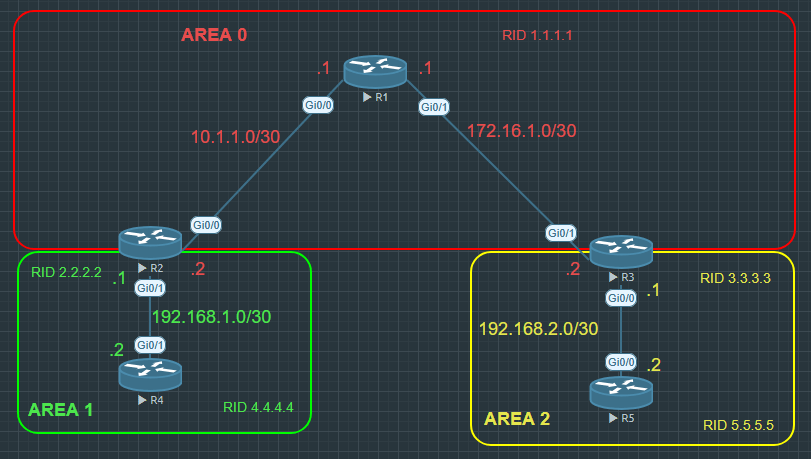
For this configuration I am going to be using multiple areas I’m going to configure area 0 will always be the backbone all routers from one area need to connect to area 0 via area border routers (ABR), in this case R2 and R3 will be the area border routers (ABR). The ABR is responsible for the LSDB for each area. Like my EIGRP configuration I’m going to be doing my OSPF configuration 3 different ways, one is the normal OSPF configuration, the next one configuration OSPF on the interfaces and the last way will be using a wild card mask for all networks.
Configuration for Router 1 configure using the networks
R1(config)#router ospf 1
R1(config-router)#router id 1.1.1.1
R1(config-router)#network 10.1.1.0 0.0.0.3 area 0
R1(config-router)#network 172.16.1.0 0.0.0.3 area 0
Configuration for Router 2 configure using the networks, notice that the 192.168.1.0 is configured for area 1 while network 10.1.1.0 is configured for area 0 (backbone area)
R2(config)#router ospf 1
R2(config-router)# router-id 2.2.2.2
R2(config-router)#network 10.1.1.0 0.0.0.3 area 0
R2(config-router)# network 192.168.1.0 0.0.0.3 area 1
Configuration for Router 3 configure using the interfaces that I want OSPF to be enabled on. You still need to enable OSPF and configure the AS with router ospf 1 command and configured the router id than you can configure OSPF on the interfaces. Also remember to configure the correct area for each interface you are enabling OSPF on. In this case interface gi0/1 will be in area 0 and interface gi0/0 will be in area 2.
R3(config)#router ospf 1
R3(config-router)# router-id 3.3.3.3
R3(config-if)#int gi0/1
R3(config-if)#ip ospf 1 area 0
R3(config)#int gi0/0
R3(config-if)#ip ospf 1 area 2
For R4 and R5 configurations I’m using a catch all networks with a wild card mask to match all, this configuration I won’t recommend using out side of a lab or testing environment because you don’t want to have everything advertised on your network with OSPF but it is away it can be configured so I did want to show that it does work. If you’ve seen this configure in a real world network environment let me know.
R4 – Config
R4(config)#router ospf 1
R4(config-router)# router-id 4.4.4.4
R4(config-router)# network 0.0.0.0 255.255.255.255 area 1
R5 – Config
R5(config)#router ospf 1
R5(config-router)#router-id 5.5.5.5
R5(config-router)#network 0.0.0.0 255.255.255.255 area 2
OPSF verifying and troubleshooting commands.
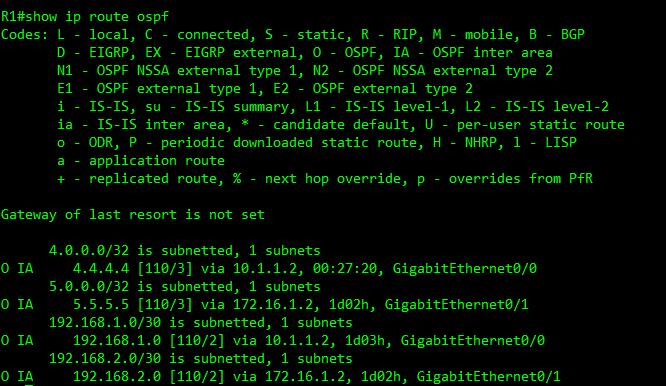
show ip route ospf – shows the routing table but filters the routes learned by only OSPF
show ip ospf neighbor – shows the OSPF neighbors, shows the Neighbor IDs the state Address of the interface and the interface of the neighbors.

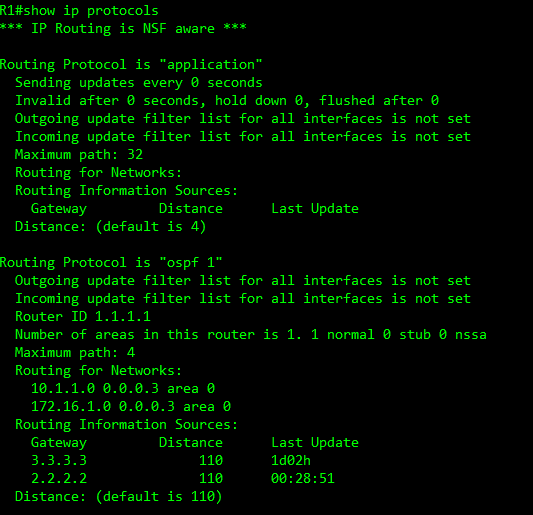
show ip protocols – shows what protocol is running, shows the areas, shows the router ID and the networks that are being advertised and the AD for OSPF. This command helps troubleshoot all routing protocols
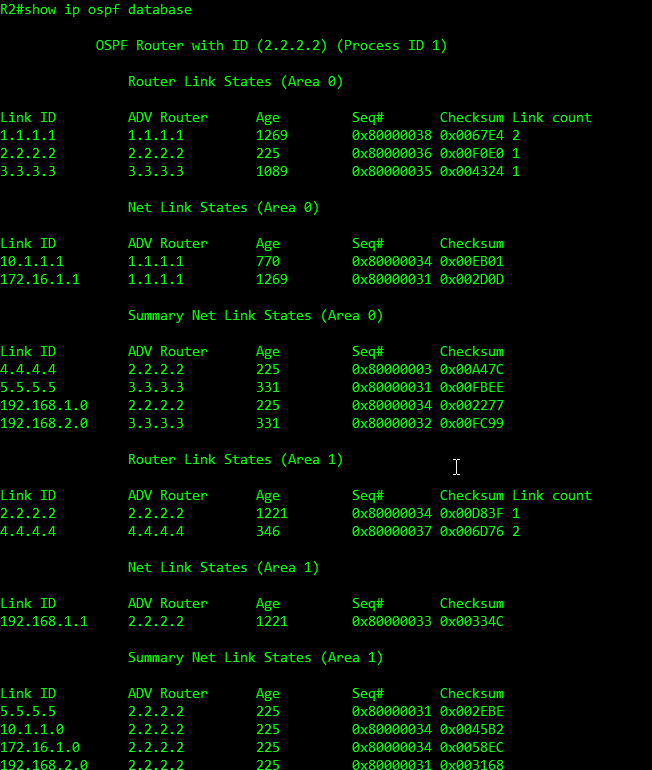
show ip ospf database – will show the LSDB on the Router one it will also show the different LSAs I’ll go over this command more on my next post about OSPF and the different sub commands to use with it.
OSPF is very complex networking protocol, I’m going to have another post for OSPF that will go over Different types of OSPF network types such as point-to-point and broadcast, the different types of LSA in more details, and OSPF stubby areas and virtual links.
 Luke Evans Networks
Leave a comment